Sound Localization
Copyright © Quectel Wireless Solutions Co., Ltd. 2026. All rights reserved.
Sound Localization is a native sound source localization and speech transcription application designed for Quectel PI M2. This project connects the Sipeed 6+ 1 Microphone Array and MA-USB8 driver board via USB, and implements 8-channel audio acquisition, voice activity detection, horizontal sound source localization, SenseVoice offline speech recognition and desktop visualization on the Quectel PI M2, which is suitable for development board function demonstration, array algorithm verification, edge voice interaction prototyping and on-site debugging.
This project showcases the integrated capabilities of Quectel PI M2 in supporting USB multi-channel audio peripherals, Python/NumPy-based signal processing, local ONNX model inference, and desktop graphical interaction. Real-time audio will not be uploaded, and transcription results are only stored in the process memory by default.
Function Overview
48 kHz, 16-bit, 8-channel PCM is captured via the
arecordinterface of ALSA.The sound source direction in the horizontal plane is estimated using six original microphones and GCC-PHAT/SRP.
Perform WebRTC VAD voting on three distributed microphones, and combine with Self-Adaptation speech band threshold to filter human voices.
Segment speech in a background thread and perform offline recognition using the local SenseVoice INT8 model.
Add a direction label in the format of
[Direction 060°]to each transcription segment; if evidence is insufficient, display[Direction unknown].It supports real-time array input, 8-channel WAV playback, synthesis direction demonstration, headless diagnosis and standalone WAV transcription.
Keep the last 20 transcription segments within the interface, and provide functions for copying, clearing, and basic threshold saving.
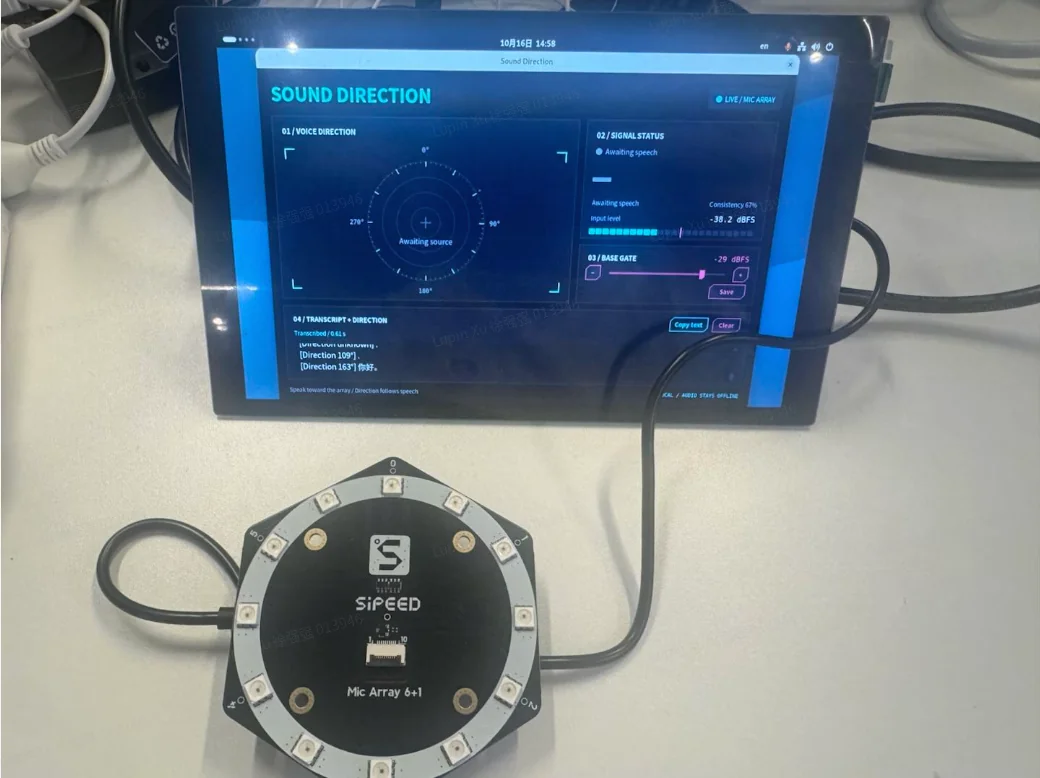
List of Development Accessories
The following accessories are used to complete the full real-time demo on Quectel PI M2. The headless diagnostics requires no display or input device, and the synthetic demo mode requires no Microphone Array.
Part Name |
|
Specifications or Requirements |
|---|---|---|
Quectel PI M2 Intelligent Development Board |
1 piece |
serving as the main control platform for USB audio access, end-side algorithms, offline recognition and interface display; the warehouse deployment records correspond to aarch64 and Debian 13. |
Sipeed 6+ 1 Microphone Array |
1 piece |
The six outer ring primary microphones shall be mapped in clockwise order to |
MA-USB8 Driver Board |
1 piece |
Provides 48 kHz audio via ALSA, |
USB data cable |
1 piece |
Connect the MA-USB8 to the USB Host of the Quectel PI M2; stable data transmission and power supply support are required. |
monitor |
1 unit, optional |
Used when directly displaying a graphical interface; the |
Quick Start
Environmental Requirements
The primary deployment platform for this project is Quectel PI M2. The board-side deployment records in the repository confirm the following environments and peripheral links:
Quectel PI M2,aarch64,Debian 13。
Python 3, Tkinter, ALSA tools, and an available graphical desktop session.
The MA-USB8 can be recognized as an 8-channel ALSA acquisition device.
There is already a deployment record of NumPy 2.2.4 on the board side.
Python dependencies are declared as
numpy>= 1.23,<3,webrtcvad-wheels== 2.0.14andsherpa-onnx== 1.13.8.SenseVoice INT8 model and vocabulary; the current model directory takes up approximately 230 MiB.
Install basic dependencies
The following commands are applicable to the Debian 13 environment in the deployment record. They will install system packages, create a virtual environment for the project, install Python dependencies, and prepare the local model:
sudo apt install python3 python3-venv python3-numpy python3-tk alsa-utils fonts-noto-cjk
python3 -m venv --system-site-packages .venv
.venv/bin/python -m pip install -r requirements-asr.txt
python3 setup_asr.py
setup_asr.py needs to access the GitHub Release address recorded in the script. It downloads the SenseVoice INT8 model, and writes to the target path after verifying the archive path:
models/sherpa-onnx-sense-voice-zh-en-ja-ko-yue-int8-2024-07-17/
If the repository already contains the model file, the script will directly report that the model is available and will not download it repeatedly.
Check the audio device
After connecting the Microphone Array and the MA-USB8, first confirm that the Quectel PI M2 can detect the acquisition device:
arecord -l
The default configuration expects the device name to be hw: MicArray, 0. If the actual name is different, you can temporarily override it:
bash run.sh --device '<实际 ALSA 设备名>' --probe --seconds 5
You can also modify [config.json](config.json) the device in it.
Run board-side diagnosis
Perform a 5-second headless acquisition check before the startup interface is launched:
bash run.sh --probe --seconds 5
Upon success, the terminal will output a JSON object containing the device name, number of frames, acquisition duration, RMS/dBFS values of the eight channels, clipping count, number of voice frames, number of valid direction frames, final angle, coherence, actual threshold, and signal-to-noise information.
Build the project
The project has no separate compile step, and runs Python source code directly on the Quectel PI M2. Both the virtual environment and the ONNX model are runtime assets, not build artifacts of the business code.
Launch the application
In the terminal of the Quectel PI M2 graphical desktop, first navigate to the project directory. The /path/to below needs to be replaced with the actual parent directory where the project is stored:
cd /path/to/sound_loca_demo
bash run.sh
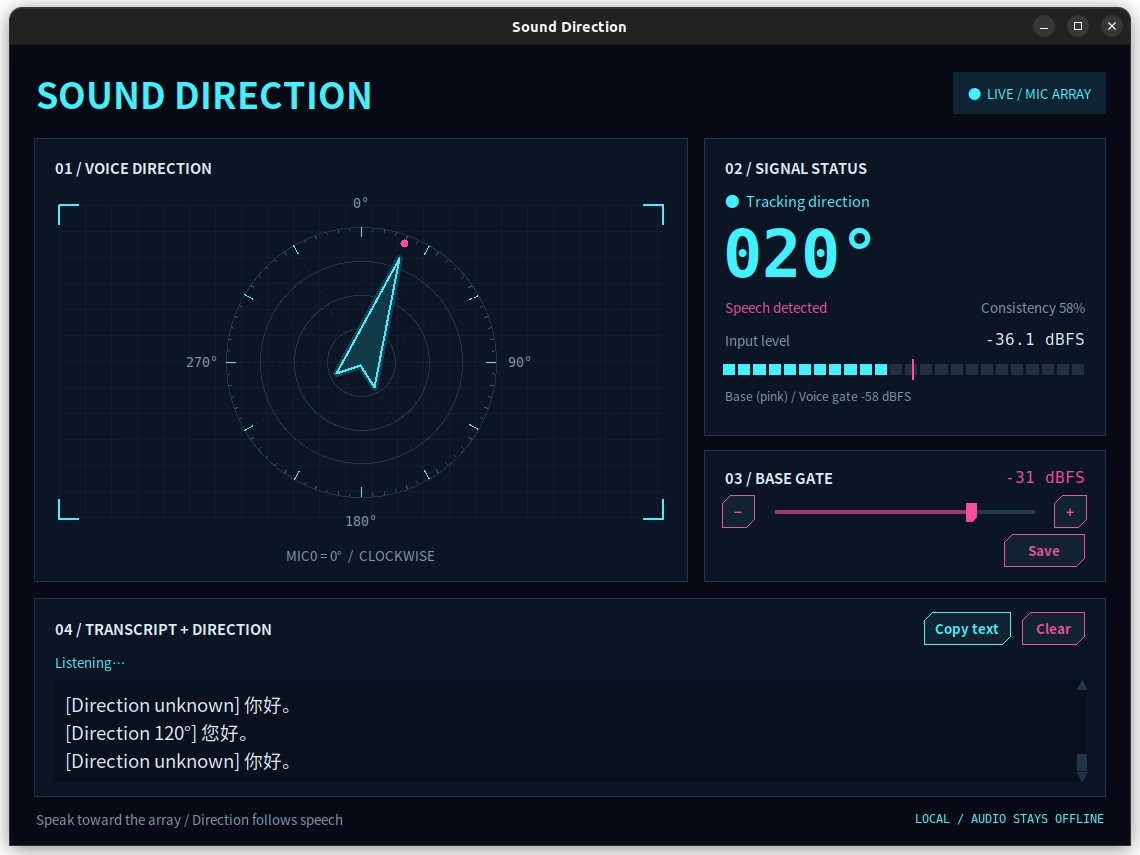
After normal startup, the direction radar is displayed on the left side of the window, the angle, voice status, level and threshold are displayed on the right side, and the offline transcription is displayed at the bottom. When running for the first time, keep the environment quiet for two to three seconds to allow the program to learn the stable background noise spectrum.
Logging in solely via SSH typically does not create a usable graphical desktop session; in such cases, use --probe, or launch the application in a desktop terminal where the development board is already logged in.
How to Use the Application
Main Interface
VOICE DIRECTION: With MIC0 as 0°, the angle increases clockwise. The cyan arrow is displayed only when the voice, direction consistency, speech frequency level and actual threshold are all passed simultaneously.
SIGNAL STATUS: Displays the current direction, voice status, heuristic consistency, input dBFS, base threshold, and Self-Adaptation voice threshold.
BASE GATE: Adjust
gate_dbfsbetween -65 and -20 dBFS using the slider, arrow keys, or−/+; the buttons adjust by 1 dB per press.TRANSCRIPT + DIRECTION: Displays the completed recognition result. Copy text to copy all current entries, Clear to clear entries from memory.
Calibrate and save the basic threshold
Keep the environment quiet for two to three seconds and observe the input level.
Speak at a normal volume within the expected distance.
Set the base threshold above most ambient sounds and below normal speech levels. The more negative the value, the easier it is to trigger.
Click Save to write
gate_dbfsback toconfig.json.
The base threshold is not the sole condition for voice judgment. After the VAD confirms the presence of voice, the program calculates the Self-Adaptation threshold based on the learned stable noise spectrum, and the interface will display both the base value and the actual operating value simultaneously. Save Only gate_dbfs will be saved, and other configuration items require manual editing.
View directional transliteration
After confirming that the status display model is ready, say a sentence to the array and pause for about one second. A result similar to the following will be appended to the transcription area:
[Direction 060°] 你好
[Direction unknown] Direction evidence is insufficient.
The direction is derived from the valid positioning results during the utterance of this sentence, rather than the arrow direction at the completion of recognition. The program performs circular averaging based on consistency and valid duration; in case of insufficient evidence or directional conflicts, the text is retained and the direction is marked as unknown.
Up to the latest 20 recognition results will be retained, which only exist in the memory of the current process. The program will not automatically save real-time recordings or transcribed texts.
Run headless diagnostics
Execute in SSH, headless device, or on-site device troubleshooting scenarios:
bash run.sh --probe --seconds 5
This mode does not load the ASR model or create a window, and only checks the acquisition, channel level, voice activity detection and positioning output.
b@HF-C-S:~/project/sound_loca_demo$ bash run.sh --probe --seconds 5
{
  "device": "hw:MicArray,0",
  "frames": 115,
  "audio_seconds": 4.906666666666666,
  "max_dbfs": -31.141714023559306,
  "channel_rms": [
    0.021183548958751082,
    0.01586236610173023,
    0.014955752892219268,
    0.011623506850791492,
    0.015094008244941195,
    0.01610835825445783,
    0.007044012766777389,
    0.006146897185292454
  ],
  "channel_dbfs": [
    -33.480025583262275,
    -35.99264061744061,
    -36.50383438256843,
    -38.693256481639224,
    -36.42390834231644,
    -35.858974402494034,
    -43.04359731151728,
    -44.226881018967504
  ],
  "channel_clipped_samples": [
    0,
    0,
    0,
    0,
    0,
    0,
    0,
    0
  ],
  "active_frames": 0,
  "last_angle": 330.0,
  "last_confidence": 0.6317844198638005,
  "vad_enabled": true,
  "speech_frames": 7,
  "sentence_direction_frames": 0,
  "effective_gate_dbfs": -58.0,
  "last_snr_db": -1.1870431568712974
}
Play back 8-channel audio recording
Play back the WAV file via the same positioning, VAD, sentence segmentation, recognition and interface paths as those used for real-time input:
bash run.sh --wav recording.wav
The file must be an uncompressed eight-channel, 48 kHz, 16-bit PCM. Playback ends when there is less than one complete 2048 sample block in the file, and the interface displays Playback ended.
Run Synthesis Direction Demo
When no Microphone Array is connected, the built-in synthetic signal can be used to demonstrate the direction algorithm and interface on the Quectel PI M2:
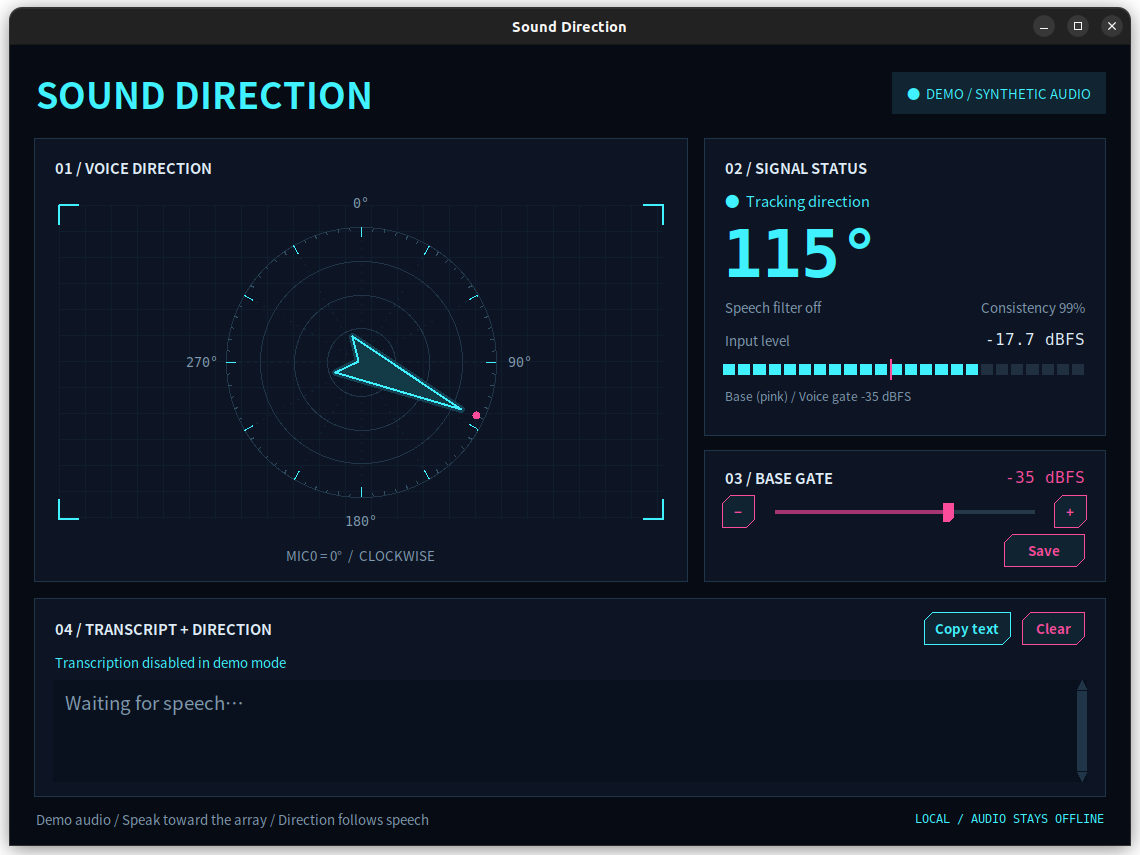
bash run.sh --demo
Demo mode will clearly display DEMO / SYNTHETIC AUDIO, and turn off VAD and ASR. This mode is designed for interface and directional pipeline demonstration, and does not represent the acoustic accuracy of real scenarios.
Independent Transcription to WAV
Short PCM WAV files can be directly recognized:
.venv/bin/python transcribe.py --file recording.wav --channel 0
Files longer than 30 seconds require VAD-based sentence segmentation to be enabled:
.venv/bin/python transcribe.py --file recording.wav --channel 0 --segment
This tool accepts single-channel or multi-channel uncompressed 16-bit PCM;the --channel parameter uses zero-based indexing. Automatic sentence segmentation supports sampling rates of 8,16,32 and 48 kHz. Recognition results are output in JSON format to standard output, and no files are written. Since a single individually selected channel does not contain array geometry information, this entry does not calculate sound source direction.
Configuration
Reads [config.json](config.json) when the application starts. Except for the basic thresholds adjusted in real time on the interface, a restart is required after manually modifying the configuration. --device only overrides the device name of the current process; the application will also set vad_enabled and asr_enabled according to the real-time, demo or diagnostic mode settings, so these two JSON values should not be treated as function toggle switches.
Configuration Key |
current value or fallback value |
Function |
|---|---|---|
|
|
ALSA capture device on Quectel PI M2 |
|
|
Sampling rate; the MA-USB8 verification requires this value |
|
|
Number of acquisition channels; this value is required for MA-USB8 verification |
|
|
Six distinct original positioning channels; CH6 is rejected |
|
|
Radius of the outer ring microphone, in meters; valid range: 0.01–0.15 |
|
|
Number of samples per block; must be a power of 2 between 512 and 8192 |
|
|
Base display threshold; interface range: -65 to -20 dBFS |
|
|
Heuristic directional consistency threshold ranging from 0 to 1, which does not represent accuracy |
|
|
Rotation angle applied to the display and reporting orientation |
|
|
Mirror the estimated direction before applying the offset |
|
|
Time to maintain the final direction after the vocal ends |
|
|
WebRTC VAD aggressiveness, ranging from 0 to 3 |
|
|
Original microphones at the start of the three dispersed VAD channels |
|
Rollback Value |
Minimum speech frequency band analysis level; not explicitly set in the current JSON |
|
Rollback Value |
Self-Adaptation threshold margin relative to learning noise; not explicitly set in the current JSON |
|
|
SenseVoice language selection; can also be set to |
|
|
the从零开始 channel fed into speech recognition |
|
|
Number of CPU inference threads; valid range: 1–8 |
|
|
Model and Vocabulary Directory |
|
|
Audio retained before vocals start |
|
|
The trailing silence required to end a sentence |
|
|
The minimum human voice duration required for a single utterance |
|
|
Maximum duration before automatic sentence segmentation |
|
Rollback Value |
The minimum valid direction duration required for a single sentence; not explicitly set in the current JSON |
|
Rollback Value |
Minimum coverage rate of valid directions for vocal duration; not explicitly set in the current JSON |
|
Rollback Value |
the minimum value of the directional circumferential concentration; not explicitly set in the current JSON |
Invalid values will be rejected during the startup phase. The validation covers audio format, channel mapping, array radius, block size, direction threshold, VAD settings, ASR channels and thread count, sentence segmentation duration, and direction aggregation threshold.
Application Demo
Troubleshooting for Common Issues
Audio capture timed out or Audio device disconnected
Check the status of the device and the occupying processes:
arecord -l
fuser /dev/snd/*
Make sure the MA-USB8 is connected to the USB Host of the Quectel PI M2, and
the devicematches the ALSA name.Close other programs that are using the exclusive capture device, then run
bash run.sh --probe --seconds 5.If the problem persists, retain the complete error text and the de-identified diagnostic JSON.
Unable to open window
Ensure that the command is run in a logged-in graphical desktop session of the Quectel PI M2.
When logging in via SSH only, use
bash run.sh --probe --seconds 5instead.Confirm that
python3-tkis installed, and check whether the desktop display environment is available.When reporting an issue, please provide the Debian version, desktop session type, Python version, and the full error text.
WebRTC VAD missing or Recognition dependency missing
Recreate the virtual environment and install the declared dependencies:
python3 -m venv --system-site-packages .venv
.venv/bin/python -m pip install -r requirements-asr.txt
Then use bash run.sh to start.
Speech model missing occurs
Check
asr_model_dirto see ifmodel.int8.onnxandtokens.txtexist in it at the same time.Run
python3 setup_asr.pyto download the model.Confirm that the Quectel PI M2 can access the model download address recorded in the script and has sufficient storage space.
Retain complete download or archiving errors, but do not disclose proxy credentials.
direction instability, mirroring, or rotation occurrence
Confirm that
mic_channelslists the six outer-ring microphones in clockwise order and does not include CH6.Keep the environment quiet for two to three seconds before testing to allow the noise model to complete initial learning.
Have a speaker test from a known direction, then adjust
angle_offset_degormirrorand restart.Reduce other speakers, audio playback, strong reflections, and steady noise near the array.
No voice detected, or noise triggers the arrow
Observe the input level, base threshold, Self-Adaptation threshold and voice status.
Adjust
gate_dbfsto a level between the ambient noise and normal speech, then click Save.Modify
vad_mode,speech_floor_dbfsorspeech_snr_dbas necessary, then restart.The played human voice may also trigger VAD, and music and noise may still cause misjudgments.
Recognize delays or skipped segments
Check whether the interface displays
Transcribing…, recognition errors or busy prompts.ASR runs in an independent CPU thread, and the queue can hold a maximum of two pending speech segments; when the queue is full, new segments will be skipped to ensure that the acquisition process continues to run.
Reduce other CPU loads, or appropriately shorten
asr_max_seconds.Skipped segments will not be written to disk, nor will they be retried automatically.
Text can be recognized, but the direction is displayed as unknown
Check the consistency during speech, the audio frequency band levels, and the on-site reflections.
Verify that the array channel order, radius, mirror and angle offset are configured correctly.
Currently, the default requirements are at least 0.12 seconds of valid direction, 20% speech coverage, and a direction concentration level of 0.6.
It is not recommended to excessively lower the threshold solely to eliminate
unknown; this may introduce erroneous directions.
Testing and Board-Level Verification
Run the full test suite from the project root directory:
bash test.sh
The test covers synthetic sound source localization, direction smoothing and jump suppression, VAD framing and three-way voting, Self-Adaptation gating, sentence segmentation, intra-sentence direction aggregation, bounded ASR queue, error reporting and real model sample identification. The complete test set contains 35 items; before the official demonstration or delivery of Quectel PI M2, all tests shall be run on the board side and the results shall be retained.
Confirmation of the deployment record of Quectel PI M2 in the warehouse: The basic algorithm test was passed on the board, 115 frames and 4.907 seconds of audio were acquired in real time for about 5 seconds, all 8 channels had signals and no clipping was detected. This record proves that the on-board audio link is operable, but does not constitute a proof of positioning accuracy or performance indicators.
The board-side deployment records confirm that the positioning and voice gating tests were previously passed on the Quectel PI M2. Since the latest version has additionally added clause segmentation, intra-sentence direction aggregation, and SenseVoice recognition tests, re-execution on the development board is still required before the official demonstration:
bash test.sh
bash run.sh --probe --seconds 5
bash run.sh
and conduct on-site inspections of voice trigger, object orientation, transcription, and long-term operation status.
Known Limitations
The application only estimates the horizontal direction of a single primary sound source, and does not estimate the distance or elevation angle, nor does it separate multiple simultaneous speakers.
The directional quality is affected by the microphone channel sequence, array installation orientation, reflections, noise and on-site calibration.
min_confidenceis a heuristic consistency score, not a localization accuracy rate.Playback of human voice may trigger VAD, and music or noise may also cause false positives.
Real-time audio recording and transcription are not persisted; clipboard data and the 20 most recent records only exist within the current desktop session.
When there are already two tasks waiting in the ASR queue, new utterances will be skipped.
USB audio devices will not automatically reconnect after being disconnected. After ruling out device-related issues, you need to restart the application.
Technical Support and Contributions
If you encounter any problems during use, please feel free to Quectel Official Forum to submit a technical consultation, and our technical support team will respond to you promptly.